Section Shop

BUILT FOR SHOPIFY · FREE TO INSTALL

Your theme.
So many more
possibilities.

Beautiful sections. Complete page templates. Product blocks and shopping tools. Build a storefront that feels like your brand, without starting over.

Ready-made sections
164
Page templates
39
Your starting point
Your theme
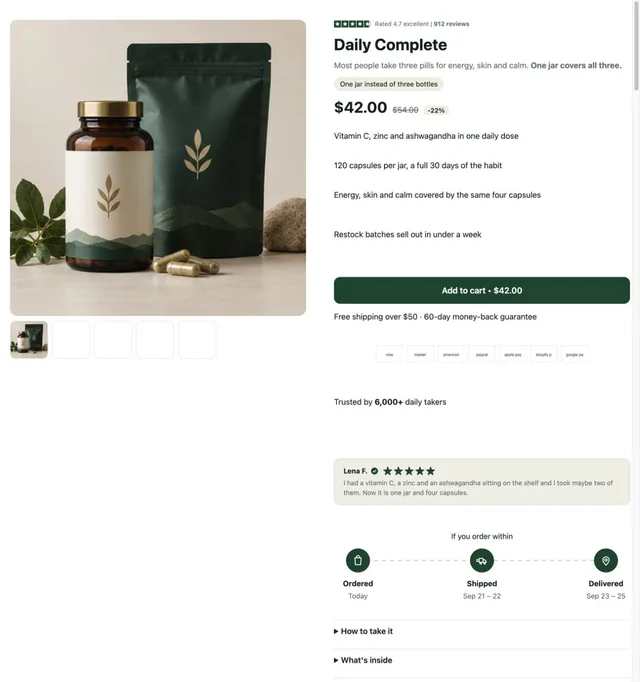
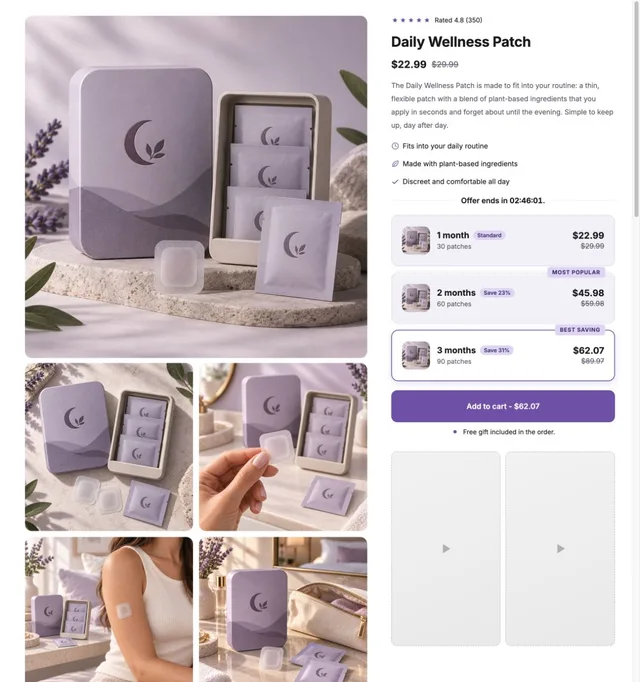
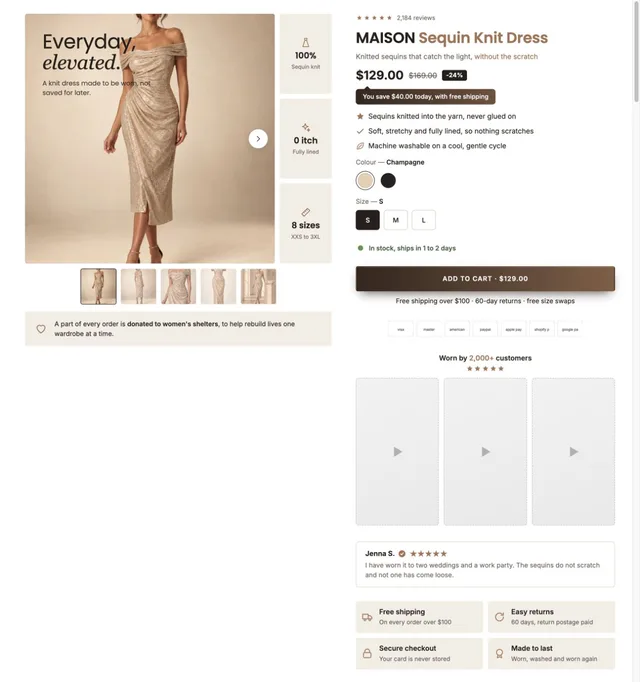
FashionFashion Shopify page templateSupplementsSupplements Shopify page templateWellnessWellness Shopify page template

Real Section Shop templates. Ready for your brand.

Theme sections ↗Page templates ↗Product blocks ↗Bundles BetaCart Drawer Beta

DESIGNED AS A WHOLE

Meet your next product page.

Start with a coordinated layout, then change the images, content and details in your theme editor.

All 39 templates →

ONE SECTION CAN CHANGE THE PAGE

Small additions. A different storefront.

Explore 164 live sections for navigation, products, storytelling, social proof and more.

Browse the library →
Preview of the Hero Image 3 Shopify section Free

Hero Image 3

Hero & Banners

A photo, a looping video or a colour behind a badge, a heading, a row of benefit pills and the buttons. The video only downloads once the hero is on screen, pauses when it leaves, and is never fetched at all for anyone who has asked for reduced motion — the still frame carries the hero instead.

View section →
Preview of the Product Grid 2 Shopify section Free

Product Grid 2

Product Showcases

A tall rotating showcase on the left and a tabbed product grid on the right, so one section covers new in, dresses and sale without stacking three. Quick look opens a panel; single-variant products add straight to the bag.

View section →
Preview of the Shoppable Stories Shopify section Free

Shoppable Stories

40 installs

Shoppable Video & Stories

Short videos that sell, as story bubbles or vertical reels. Previews play silently while on screen; a tap opens a full-screen player with progress bars, sound, and a swipe from one video to the next, and beside each video (over it on phones) sit the products it shows — options, price and an add to cart that never leaves the video. On a product page the stories can sit right inside the product details: under or above the buy buttons, under the title or under the description, and a video left without products sells the product of the page. No external libraries.

View section →
Preview of the Team Grid 1 Shopify section Free

Team Grid 1

Content & Extras

The people behind the shop: a heading, a few lines that turn "we" into faces, then the team in a grid with a round photo, a first name, a role and one line each. Three or four per row, the last row centred.

View section →
Preview of the Mega Search Header Shopify section Free

Mega Search Header

Headers & Navigation

A header built around search, for large catalogues: a wide search bar with a product-type picker and live suggestions (matching searches first, then products with photo and price), and a menu row whose items open panels across the full width, as wide as the page, or as a card sized to their links — headed columns for three-level menus, each collection's picture in front of its link (square, rounded or round, as you set), a "Shop all" link, and stacked pictures or banners on either side of the links. Any menu item can wear a small label such as HOT or NEW in your colours, with a twinkling icon if you like. A deal link shines in your accent colour, and the cart can wear your own icon. Shoppers sign in through Shopify's own account button and choose their country (and so their currency) and language in a compact panel with a search box for long lists. It stays on top as the page scrolls (slimmer, hidden on the way down, or down to the menu row alone), keeps the cart count right after any add to cart, and becomes a side-sheet menu on phones with its own search row, the same pictures and labels, short texts and your own code above or below each item's links, and the first link of each sub-menu worded as you like. Every in-between tone is computed from your colours and checked for contrast.

View section →
Preview of the Product Slider 10 Shopify section Free

Product Slider 10

Product Showcases

A quiet row of products under a heading and one button, with a progress line and a counter underneath. The arrows and the progress only appear when there is genuinely more to see, and the counter reads the real scroll position so it follows a swipe as well as the arrows.

View section →
Preview of the Countdown Hero 2 Shopify section Free

Countdown Hero 2

Countdown Timers

A full-bleed hero with the offer, a live clock and a button set over one or more photographs. Add a second photo and it becomes a slideshow; with one it draws no navigation and loads no slideshow code. Heights are measured against the screen a phone actually shows, so the hero is never taller than the visible area.

View section →
Preview of the Shop Collections 7 Shopify section Free

Shop Collections 7

29 installs

Collection Showcases

A rail of full-bleed collection cards with the copy laid over the photo, positioned in any of nine spots — set separately for desktop and phones. Optional autoplay, dots and arrows, each toggled per screen size.

View section →

MORE OF YOUR STOREFRONT, IN ONE APP

From the first scroll to the cart.

Choose the tools your store needs. Customize the experience around your products.

PRODUCT BLOCKS

The details that make a product page.

Buying tools, shipping information, benefits and social proof. Explore all 19 blocks and style them in your theme editor.

All 19 product blocks →

Real Section Shop block designs with sample products, offers and reviews. Customize them with your own content in the theme editor. Preview shopping controls are inactive.

BUNDLES · BETA

Make your offer look as good as your products.

Quantity breaks, gifts, complementary products and build-your-own offers. Start from one of 8 templates.

All 8 bundle templates →

Actual app template previews with sample products, prices, offers and reviews. Customize the content and settings for your store. These are visual previews; shopping controls are inactive.

CART DRAWER · BETA

A cart with your brand’s personality.

8 ready-made styles, from minimal fashion to botanical beauty. Customize the layout, recommendations and reward messaging.

All 8 cart designs →

Actual app template previews with sample products, prices, offers and reviews. Customize the content and settings for your store. These are visual previews; shopping controls are inactive.

CUSTOMIZATION THAT GOES BEYOND COLORS

Keep the design.
Take control of the details.

Collection

Product card
Product image Ratio · borders · padding
Product information
Title Font · size · alignment
Price
Text with icon
Image
Compatible app widget

Arrange the content your way.

Collection templates use organized product-card blocks. Move the title and price, add images, adjust spacing and typography, or insert a compatible review-app widget.

Build on the theme you already use.

Installed sections and page layouts use your Shopify theme editor. Bundles and Cart Drawer have their own editors inside Section Shop.

Explore collection customization →

FROM IDEA TO STOREFRONT

Preview. Customize. Publish.

01

Choose your starting point

Browse sections, page templates or product blocks and preview the designs.

02

Make it yours

Install into your chosen theme. Add your own products, images and copy, then adjust the design.

03

Check and publish

Preview desktop and mobile, test shopping actions and publish when the page is ready.

Have a section in mind?

Use Request Section in the app to describe your idea, attach screenshots and leave a contact email.

Contact support →

Frequently asked questions

What can I build with Section Shop?

Choose from 164 live theme sections, complete page templates, product blocks and shoppable video layouts. Bundles and Cart Drawer are also available in beta.

Is Section Shop free?

Section Shop is currently listed as Free on the Shopify App Store. Check the listing and any price shown inside the app before installing or activating a feature.

Do I need to change my theme or know how to code?

No theme switch is required. Install sections or a page template into your chosen Online Store 2.0 theme and customize the content in the Shopify theme editor. App-block placement depends on what your theme supports.

Can I customize the templates?

Yes. Change your copy, images, colors, fonts and spacing. Collection templates also offer organized product-card blocks, image ratios and borders, editable information groups and compatible external app widgets.

What are Bundles and Cart Drawer beta?

These are app-managed shopping tools with their own editors. Complete setup and any Shopify permission requests, enable the required app embed, and test your offers and cart before activation. They are still being improved.

Can I preview designs before installing?

Yes. Browse real template previews on this website and explore sections and blocks inside the app. The final result depends on your theme, products, content and settings.

More questions, answered →

Your next storefront starts here

Explore 164 sections, complete page templates and shopping tools. Install Section Shop free and build on your existing theme.

Built for Shopify · Free to install · For Online Store 2.0 themes · No code